WolfByte.Works™

← All apps

Windows 10 & 11 · macOS 13+ · Linux server · Rust + Swift

MB Helper™

One shared memory for every AI you use.

MB Helper keeps MemoryBox™, one shared set of memory and instructions, current on every computer, so Claude, ChatGPT, Codex, Gemini and Grok all work from the same profile, preferences and project notes. It lives in the Windows system tray or the Mac menu bar, syncs quietly, and only asks for you when something needs a Yes or No.

Version 01.34.02 · Not available yet

Try the interactive demo

Try it

Interactive demo · sample data

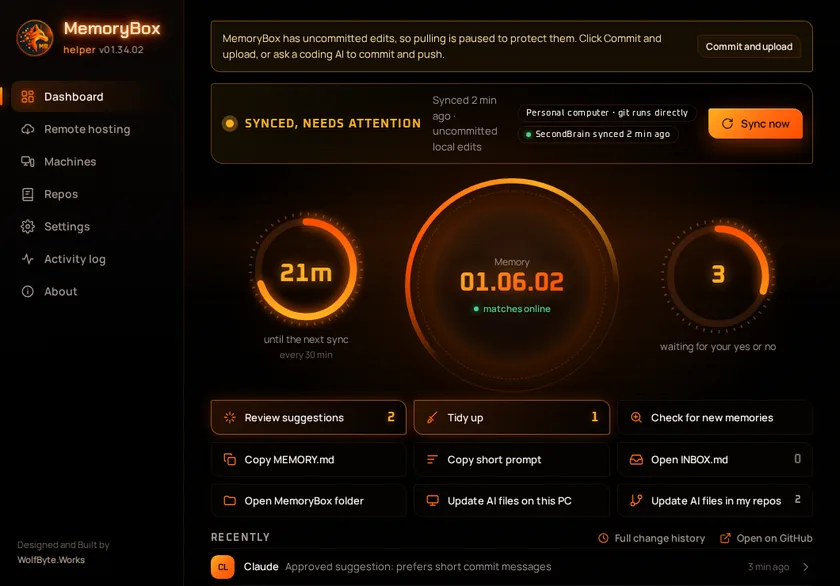
This is MB Helper’s real interface running in your browser on sample data. Nothing here connects to a real MemoryBox.

  • Press Commit and upload on the warning at the top to save the edits an AI left behind
  • Press Sync now and watch the reactor spin up, then click an entry under Recently to see what it changed
  • Open Review suggestions and save or decline each card, or tick a few and press Save selected
  • Open Machines to see every computer, then switch a shared skill off and back on
  • Flip a repo’s switch on the Repos page, where repos are grouped by owner
  • Press Sync now and watch the SecondBrain chip on the dashboard update, then find the vault switch in Settings
  • Filter the Activity log, then select a few lines and press Copy
  • Switch Remote hosting between main and backup
Open full screen ↗
Skip past the demo

What it does

Reactor dashboard

The memory version, whether it matches online, a countdown to the next sync and how many items are waiting for you, all on one screen, plus when your notes vault last synced. Hover any button for a tooltip, and click a recent change to see the lines it added and removed. If an AI leaves edits in MemoryBox without saving them, pulling pauses to protect them and one button commits and uploads them.

Nothing saved without a yes

Suggested memories wait in a review list. Decide each card on its own, or tick several and save them together; nothing reaches MemoryBox until you say yes. New suggestions send a notification, and the Mac menu-bar icon shows how many are waiting.

Finds new memories

Checks the memory files your AI apps keep on this computer and in your repos, and offers anything new.

Machines

Every computer running MB Helper on one page, including a Linux server running it in the background: its version, last sync and shared skills and plugins. One that is behind, can’t sync or is offline stands out, and you get an alert when your server goes down and when it’s back.

The same AI skills everywhere

The skills, plugins and connectors you use with Claude Code and Codex are kept the same on every computer. Switch one off everywhere, delete it, bring it back, or go back to before a recent change. Each shared plugin carries a risk hint, and updates wait a week before they install unless you push them out.

Choose which repos know MemoryBox

A switch for each of your GitHub repos, grouped by owner and including your organizations’ repos, decides which ones get the MemoryBox block in their AI instruction files, so cloud AI sessions find your memory too. New repos start off, and repos tagged no-memorybox are always skipped.

Remote hosting

Phone and web AI apps can reach your MemoryBox through a private tunnel, with a main host and an automatic backup.

Activity log

A 24-hour chart above a live, filterable, dated log of every sync, save and update. Select lines or press Copy to copy them.

Your notes vault, synced too

MB Helper can keep an Obsidian notes vault cloned and in sync on every computer, with no Obsidian Git plugin to look after. When two computers change the same note, both sets of lines are kept.

Screenshots

MemoryBox for iPhone In development

A native SwiftUI companion that brings the same MemoryBox to iPhone, so your profile, preferences and project notes travel with you. It’s in development now.

Recent updates

  • 01.34.02Nov 9, 2026

    When an AI edits MemoryBox and doesn’t commit, the warning that pulling is paused now has a Commit and upload button that saves and uploads those edits in one click.

  • 01.34.00Nov 8, 2026

    A settings file that can’t be read is kept aside instead of being overwritten, an update check without access says so instead of “Up to date”, the “MemoryBox updated” notice leaves out MB Helper’s own bookkeeping, and the window does less work while it’s open.

  • 01.33.18Nov 4, 2026

    Pushing out a newer version of a shared plugin no longer breaks Claude Code sessions that are already open.

  • 01.33.12Oct 29, 2026

    Sync now waits for another memory job on the same computer to finish instead of stopping with a sync problem.

  • 01.33.10Oct 28, 2026

    Saving memories works on computers where Git has no name or email set, errors show Git’s real reason, and a saved change is no longer reported as “Not saved”.

  • 01.33.08Oct 26, 2026

    Sync uploads your changes even when your MemoryBox copy is on a differently named branch.

  • 01.33.06Oct 26, 2026

    On Mac, the sync status tooltip no longer pops up by itself over other apps; the live status stays at the top of the menu.

  • 01.33.04Oct 21, 2026

    Saving memories from phone and web AI apps through remote hosting no longer stops once MemoryBox holds more than 24 memory files.

  • 01.33.00Oct 19, 2026

    The dashboard shows when your notes vault last synced, in green, red if the last vault sync failed, or amber before the first one.

  • 01.32.02Oct 19, 2026

    The Repos page lists every repo, including your organizations’ repos, in a section per owner, and refreshes at every sync.

  • 01.32.00Oct 19, 2026

    MB Helper can keep an Obsidian notes vault cloned and synced on every computer. Edits to the same note on two computers are both kept.

  • 01.31.00Oct 18, 2026

    A new Repos page with a switch for each of your GitHub repos. The list is kept in MemoryBox, so it’s the same on every computer.

  • 01.30.00Oct 18, 2026

    Adding MemoryBox to your GitHub repos now only touches the repos you choose, starts off on new installs, and always skips repos tagged no-memorybox.

  • 01.29.08Oct 18, 2026

    Each suggested memory can be saved or declined on its own, or several at once with Save selected and Save all. New suggestions send a notification, and the Mac menu-bar icon shows how many are waiting.

  • 01.29.00Oct 17, 2026

    Copy MemoryBox prompt in the tray and menu-bar menu: one click copies what a new AI project needs to start reading MemoryBox.

  • 01.28.10Oct 17, 2026

    Every shared skill, plugin and connector gets a light and an on/off switch. Shared plugins carry a lower, medium or higher risk hint, install only at a reviewed version, and can be pushed out to every computer at once.

  • 01.28.00Oct 16, 2026

    Work and personal computers: the AI on each can message the other and hand work over through MemoryBox, with a handoff note kept in every project.

  • 01.26.00Oct 16, 2026

    A new Machines page shows every computer’s status at a glance, with alerts when your server goes down and when it’s back. Shared skills, plugins and connectors can be removed everywhere, brought back, or rolled back to before a change.

  • 01.22.00Oct 15, 2026

    Tooltips on the dashboard buttons, a click on a recent change shows what it did, and Remote hosting shows whether your server is up.

  • 01.19.00Oct 15, 2026

    The same skills and plugins for Claude Code and Codex on every computer, and a Linux edition that runs as a background service.

  • 01.17.00Oct 12, 2026

    Adds MemoryBox to your GitHub repos: at each sync, your repos get the MemoryBox block in their AI instruction files, so cloud AI sessions find it too. Archived, forked and empty repos are skipped.


Want something like MB Helper for your team?

Get in touch