WolfByte.Works™

All systems built

Native apps, forged for Windows, macOS and iPhone.

WolfByte.Works designs and builds fast, focused desktop and mobile tools in Rust and Swift. Black glass, ember light, nothing you don’t need.

The apps

Built and in use

Windows · macOS · Rust + Swift

MB Helper

Keeps MemoryBox, the shared memory that Claude, ChatGPT, Codex, Gemini and Grok all read, current on every computer. It lives in the Windows tray or the Mac menu bar, syncs quietly, and only asks you for a Yes or No.

  • Reactor dashboard shows the memory version and sync state
  • Suggested memories wait for your approval before saving
  • Machines page: every computer's status at a glance
  • The same AI skills and plugins on every computer
  • A switch per GitHub repo for the MemoryBox block
  • Remote hosting and a dated, copyable Activity log

Version 01.34.02 · Not available yet

iOS · SwiftUI

MemoryBox for iPhone

A native SwiftUI companion to MB Helper that brings the same MemoryBox to iPhone, so your profile, preferences and project notes travel with you.

  • Native SwiftUI interface
  • Reads the same MemoryBox your desktop apps keep in sync
  • Currently in development

In development

More about MB Helper and MemoryBox →
In development

macOS 11.5+ · Windows 10 & 11 · iPhone & iPad · Swift + Rust

WolfByte Remedy

Native disk analysis and cleanup for the Mac and Windows PCs. A storage dashboard, review-first cleanup, and a confirmation before anything is removed. Universal for Apple Silicon and Intel on the Mac.

  • Scan, Review, Confirm, Clean: nothing is removed until you confirm
  • Six cleanup categories with per-file review
  • Battery Health: charge, capacity health and cycle count
  • Ten designs and six colors, in Light, Dark or Match Mac or Windows
  • On Windows: drive optimization, Space Map and a partition manager

Coming to iPhone and iPad. A native iOS edition is in development: it finds duplicate photos and videos, large videos and old screenshots, cleans up contacts and old calendar items, shows battery status, has its own ten Home designs in the same six colors, and still asks you to review and confirm before anything is removed.

Mac version 01.09.22 · Windows version 01.15.16 · Not available yet · iPhone & iPad in development

Windows 11 · Rust

WolfByte CTM

Switches the Windows 11 right-click menu between the classic Windows 10 style and the modern Windows 11 style, then restarts Explorer for you. Per-user, with no admin rights needed.

  • Shows which menu style is in use right now
  • Two linked toggles and one Apply button
  • Never elevates and touches only the current user

Version 01.01.00 · Not available yet

Also built

Other apps

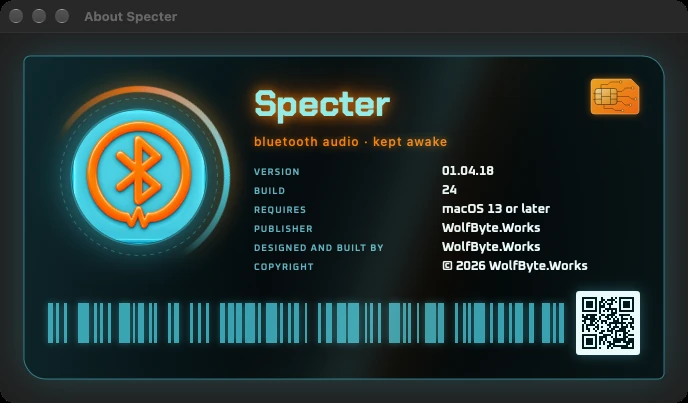
Specter's About card

macOS 13+ · Apple silicon · Swift

Specter™

Keeps Bluetooth headphones and speakers awake on your Mac. Many of them fall asleep after a few quiet minutes, then clip the start of the next sound or drop the connection. Specter sits in the menu bar and plays a one-second tone every few minutes, too low and quiet to hear, so they stay connected; even soundbars that ignore pure silence stay awake. It can start at login, and the menu bar icon comes in three styles.

Version 01.04.18 · Not available yet
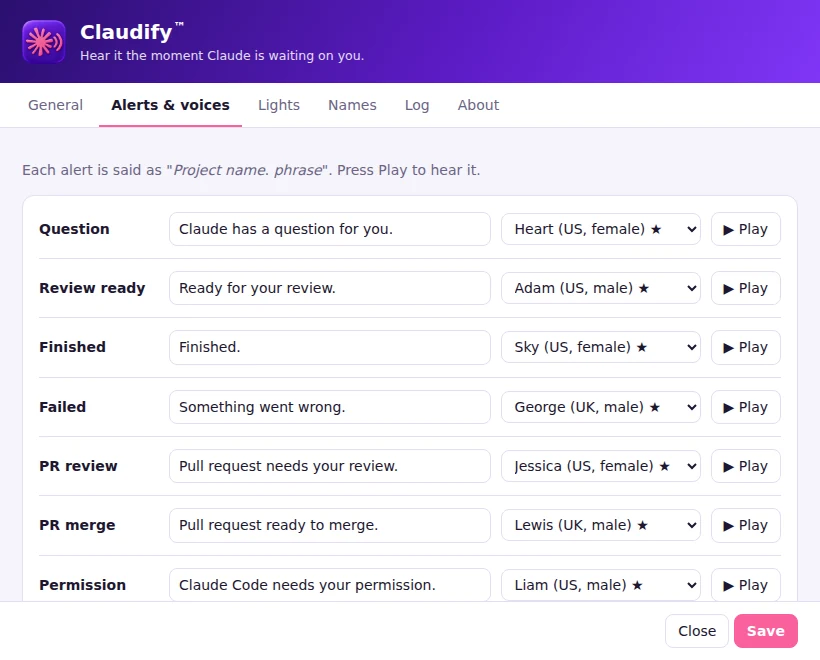
Claudify's Alerts and voices settings

macOS · Windows · Python

Claudify

Hear it the moment Claude is waiting on you. Claudify lives in the menu bar or tray and speaks up when a Claude Projects thread has a question, is ready for review or has finished, each in its own voice. The voices are made on your computer, so nothing goes to a speech service, and quiet hours keep it silent when you want. It can also turn Govee smart lights a color while Claude is waiting on you, and Turn off status lights in its menu switches them off until the next alert.

Version 01.00.29 · Not available yet

What I build

Software that fits the way you work

Every app on this site started as a real problem someone had. If you have one too, here’s the kind of work I take on.

Windows and Mac apps

Native desktop apps and tray or menu-bar utilities, built in Rust for Windows and Swift for macOS: lightweight, no heavy runtimes, with light and dark modes.

Like MB Helper and WolfByte CTM

iPhone and iPad apps

SwiftUI apps that feel at home on iOS, with widgets, themes and privacy-first permissions.

Like WolfByte Remedy for iPhone

Tools for IT teams and MSPs

Technician tools that turn a long checklist into one window: printer repair, disk cleanup, new-PC builds and OneDrive or SharePoint migrations.

Built from hands-on IT and MSP work

White-label builds

A proven app rebuilt in your company’s name, colors and logo, from the app icon to the About screen.

Your brand on a working app

Automation and scripts

PowerShell and shell scripts for unattended installs, updates, cleanup and reporting, with a clear log of everything they did.

For the jobs nobody should do by hand

Rebuilds of tools you already use

An aging script or in-house app turned into a modern, native tool your team will actually enjoy opening, without losing what it already does.

Like CTM, rebuilt from C# into a tiny Rust app
Tell me about your project

How I work

Clear steps, no surprises

  1. Scope

    We agree on what the app does, who uses it, and what it must never do.

  2. Design

    You click through interactive mockups and pick a direction before any code is written.

  3. Build and test

    Every release gets a version number, a changelog and a round of testing on the platforms it targets.

  4. Deliver

    You get the app, an installer where it needs one, a README and user documentation.

  • Asks before it changes anything
  • Light and dark modes
  • Versioned releases with changelogs
  • Documentation with every release
  • Source kept in a private repository
  • Windows, Mac and iPhone

About

Designed and Built by WolfByte.Works

Every app here is native to its platform: Rust on Windows, Swift on macOS and iPhone. Each one does one job well, asks before it changes anything, and carries the same black-glass, ember-lit look from tray icon to About window.

Contact

Have an idea for a tool?

Send a message and it comes straight to me.

I'll use your name and email only to reply to you. See the Privacy Policy. The spam check is run by hCaptcha, and its Privacy Policy and Terms apply.