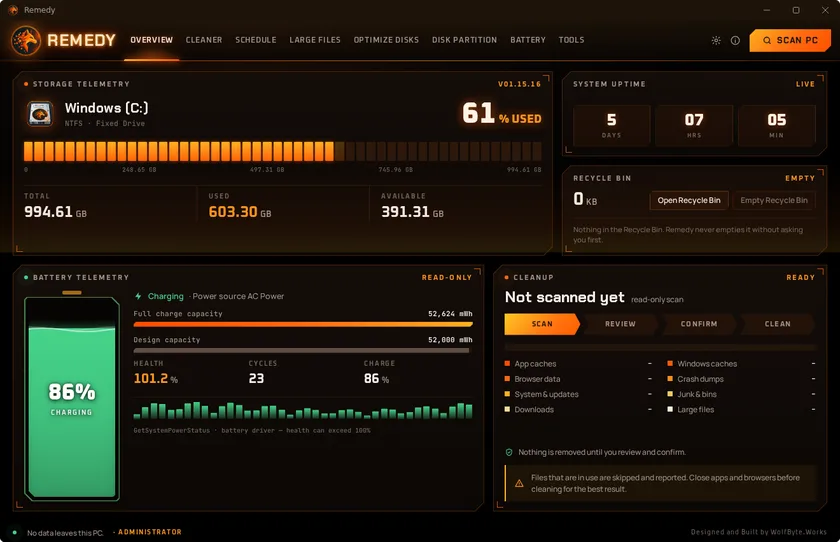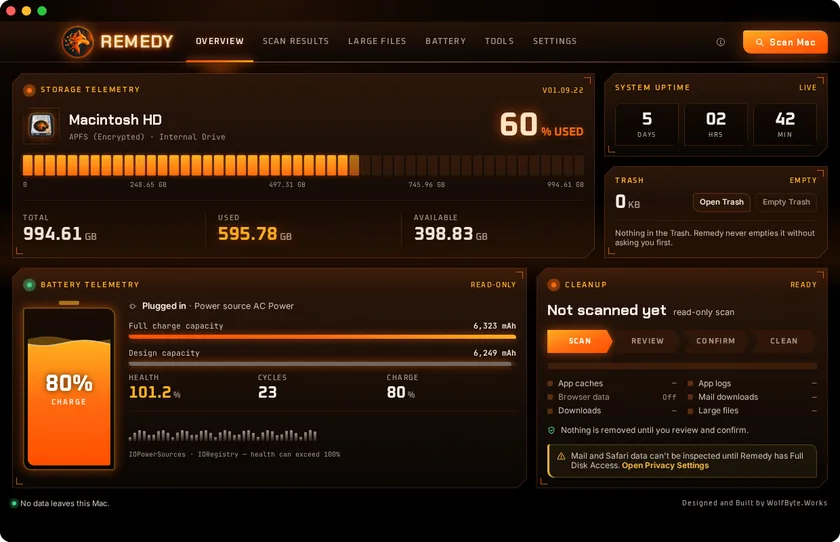
Disk health at a glance
Volume, format, total, used and available space on a segmented storage meter, plus system uptime and what’s waiting in the Trash.
 WolfByte.Works™

macOS 11.5+ · Windows 10 & 11 · Swift + SwiftUI · Rust
See where the space went. Recover it safely.
Native disk analysis and cleanup for the Mac and Windows PCs. Remedy answers two questions quickly: where has the space gone, and what can be recovered without risking anyone’s data? It never removes anything on its own; you review and confirm first.
Mac version 01.09.22 · Windows version 01.15.16 · Not available yet · iPhone & iPad in development
Interactive demo · sample data
A working recreation of Remedy for Mac with sample files. Nothing on your computer is scanned or touched.
Volume, format, total, used and available space on a segmented storage meter, plus system uptime and what’s waiting in the Trash.
A protected workflow that’s always on screen. Nothing is removed until you confirm.
Application caches and logs, browser data, Mail downloads, Downloads and large files from Downloads or the whole home folder, with each item’s name, size, location and date shown before you choose what goes. Browser history, cookies and autofill can be turned on in Settings.
After a scan, Clean removes what you selected while a ring fills, then shows what moved to the Trash, with Empty Trash and a saved report in the same window.
Space Map shows the biggest folders one level at a time, Drive Health reads each drive’s own health report, Startup Items lists what runs at sign-in and who signed it, and Uninstall removes an app with the leftovers you tick.
A read-only page with your Mac’s charge, power source, battery health from its capacity and cycle count, and a daily health history kept on the Mac. Anything the Mac doesn’t report stays marked unavailable.
Optionally clean caches, logs, browser caches and Mail downloads daily or weekly, always to the Trash and never your own files.
Asks before closing an open browser, skips it if you say so, and reopens it after cleanup.
Pick from ten designs, each with its own window layout and Overview, in six colors and Dark, Light or Match Mac, which follows your Mac’s appearance live.
A native Windows edition for Windows 10 and 11 (64-bit), in the same ten designs and six colors, Dark, Light or Match Windows. It looks for twelve kinds of clutter, from app, Windows and browser caches to crash dumps, Windows Update leftovers and the Recycle Bin of every drive, shows each item before you choose, and sends what you clean to the Recycle Bin by default. Open browsers are closed only if you agree, and reopen afterwards with every tab restored. Beyond cleanup there is drive optimization with drive health, a read-only Space Map of one or all drives, startup apps, an uninstaller, scheduled cleaning, battery health with a history, and a partition manager that creates, resizes, moves, merges, splits and clones partitions and formats drives, showing every change on a map and asking twice before anything is written.
Interactive demo · sample data
The real Remedy for Windows interface running on sample data. Nothing on your computer is scanned or touched.
A native iOS edition for iOS and iPadOS 18 and later. A full-screen swipe deck sorts photos and videos left to delete or right to keep, with Undo and a bin you empty when you are ready. It compares duplicates and similar shots side by side, finds large videos and old screenshots, can make smaller copies of photos and videos with a preview first, merges duplicate contacts card by card, and clears ended calendar events and completed reminders while leaving other people’s shared items alone, with an undo for 30 days. Home shows your newest photos, videos and contacts next to storage and battery, in ten designs and six colors, light or dark. Its Battery page shows this iPhone’s live charge, charging state and Low Power Mode, with an optional private journal for the battery health and cycle count you read in iOS Settings. Everything is reviewed and confirmed before it’s removed.
Interactive demo · sample data
A working recreation of the iPhone app with sample photos and contacts.
The windows that check planned partition changes and boot-time moves now stay open until the check finishes, and the cleaning window stays open until the browsers Remedy closed are back. When Windows can’t read the startup items or installed apps, Tools says so with the reason and Refresh tries again, and Optimize names any drive it did not finish.
Stopping a scan while Remedy waits for a browser to quit, or after it closed browsers, now opens those browsers again.
The Calendar & Reminders cleaner says “Restoring…” while it puts a backup back, instead of “Checking…”.
Moving Windows to a disk you just plugged in no longer stops with “The device is not ready”: Remedy waits for the new disk to be ready and carries on.
A leftover note from a boot-time move that never started (or already finished) no longer blocks partition work, and boot-time mode decides more carefully when a partition may be moved without locking it.
In the Scan Radar design, Select all shows ticked once every category it can tick is ticked, and the removed count shows what the last cleanup removed. Ember Glass shows when the Mac is charging, Oscilloscope reads “at design” at exactly 100%, and the Full Disk Access notice goes away by itself once access is granted.
With automatic updates off, a downloaded update waits until you press Install and Relaunch. A file picked in both Downloads and Large Files is counted and removed once, Large Files measures sizes the way they are shown, Restore Defaults also resets the theme and schedule, and a damaged battery history is never overwritten.
Large Files and the Advanced Cleaner skip Dropbox, Google Drive, iCloud, Box and other cloud folders. An update that doesn’t install no longer retries over and over, a setting from a newer version no longer resets the others, and the Overview totals add up.
Calendar & Reminders can’t restore the same cleanup twice, Contact backups list newest first, Home shows contact faces with limited Contacts access too, and a rescan keeps the photo bin. The storage widget comes in the app’s six colors, light and dark.
The Scan and Review steps can be clicked, like on Windows: Scan starts a scan, and in the HUD Cockpit design Review opens the results. The Full Disk Access check works on macOS 27, and the setup sheet closes by itself once access is turned on.
Security fixes, unused code removed, and the About card loses its faint WOLFBYTE.WORKS lettering.
A new Tools page with Space Map, Drive Health, Startup Items and Uninstall. Battery Health keeps a daily health history on the Mac. Browser history, cookies and autofill can be cleared when turned on in Settings, Large Files can search the whole home folder, and routine cleaning can run on a schedule. Cleaning reports can be saved, and app updates moved to About.
After a scan the top button reads Clean. Cleaning and emptying the Trash show a progress ring, then the result in the same window. The About card gets the WolfByte.Works SIM-card chip.
The window opens wide enough that the REMEDY name is never cut off in the top-bar designs.
Boot-time mode moves C:, the EFI partition and MSR at a restart, after showing the whole plan and every check.
Space Map maps several drives at once, and Large Files shows a live scanning bar.
A new Tools tab with drive health, startup apps and an uninstaller. Cleanup reports can be saved, and battery health keeps a history.
The battery charge shows as approximate (≈), because iOS only gives apps the charge in 5% steps; VoiceOver reads it as about that percent.
A full-screen swipe deck with a bin for photos, videos and contacts; side-by-side duplicate and similar-photo compare; contact merge cards; Home tiles show your own photos and contacts; calendar cleanup spares other people’s shared items and can be undone for 30 days; scans keep going in the background and results are saved.
Teal Seafoam joins the colors, so Home comes in ten designs and six colors.
Ten designs, six colors and Dark, Light or Match Mac under Settings, Theme. Each design has its own window layout and Overview. The battery is a rolling liquid at the current charge, REMEDY flickers like a neon sign, and Command-R scans.
Home is now a native dashboard in ten designs and five colors, light or dark, bringing storage, battery and cleanup together.
New HUD design: a top bar with tabs replaces the sidebar, with live storage, uptime, Trash and battery panels on Overview and an ID card on About. Updates can now install automatically.
New Battery page in Settings: live charge, charging state and Low Power Mode, plus an optional journal, kept only on the phone, for battery health and cycle counts you enter yourself. Also fixes a crash when checking contacts before a merge.
New Battery Health page: charge, power source, battery health from capacity and cycle count, read-only and refreshing while it’s open.